


Managing your hosting package is easy with the Feature Manager in WHM/CPanel. This powerful tool allows you to customize features of your web hosting account, giving you more control over the options you offer your users. Think of configuring email accounts, managing databases, or fine-tuning security settings; the Feature Manager makes it clear and accessible.
Efficiency is key when setting up your hosting environment. By enabling or disabling options in the Feature Manager, you can create a customized experience for each user. From simply enabling FTP access to more complex tasks like setting up cron jobs, this tool meets those needs with just a few clicks.
Clarity and ease of use are key when using Feature Manager. It provides granular control over the available tools within your hosting package. When setting up plans for customers, you can easily select the features they need to achieve their online goals, ensuring an efficient and personalized hosting experience.
What is the Feature Manager in WHM/CPanel?
The Feature Manager in WHM/CPanel is a powerful tool that helps you customize the services and features available to your hosting customers. By enabling or disabling features, you can control which tools your users see and use in their CPanel environment, making the experience easier and more secure for everyone.
How do you configure the Feature Manager?
- Access to WHM: Log in to your WHM dashboard with the correct credentials.
- Navigate to Feature Manager: Go to 'Packages' and select 'Feature Manager'.
- Create a new feature list: Select 'Add a new feature list', give it a name and click 'Add'.
- Select features: Choose from the available CPanel features that you want to include or exclude for your customers.
- Save your settings: After selecting, click 'Save' to activate your custom feature list.
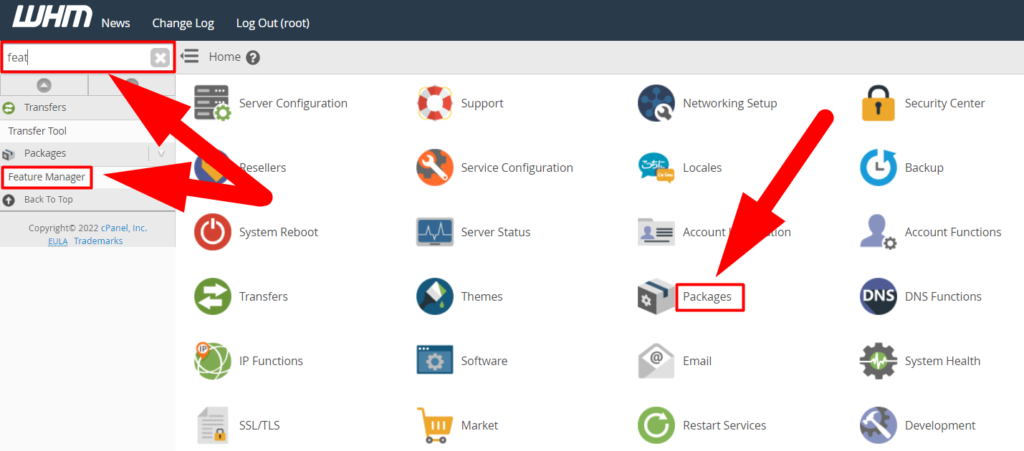
The Role of Feature Lists
Feature lists play a vital role in streamlining your hosting packages. You can create different lists for different hosting plans, ensuring your customers get exactly what they need, without confusing extras.
- Streamlined management: Simple interface that provides clarity in which features are available for which package.
- User-friendliness: Improves usability by removing unnecessary options from the customer panel.
- Safety and control: Fewer features means less risk of configuration errors or security issues.
- customization: Create hosting packages that meet the specific needs of your customers.
Effective use of feature lists
With feature lists, you can offer a tailored experience; for example, beginners get a simplified dashboard, while advanced users have access to more complex tools. The result: a personalized and efficient interface for every customer.
Changes to existing feature lists
You're never locked into a feature list. You can always edit it using the "Edit a Feature List" option in WHM. Add new features or remove them as needed to meet the changing needs of your customers or the market.
Tips for optimizing the Feature Manager
- Regular updates: Check the feature lists regularly to ensure they stay current with the latest CPanel updates.
- Customer feedback: Use customer feedback to assess and optimize feature availability.
- Security first: Be cautious about offering complex features that could compromise system security.
- Precise selection: Select only the features that actually add value for the target customer group.
If you are looking for robust web hosting with the flexibility to offer your customers a personalized experience, consider our reseller hosting packages featuring CPanel access. With our packages, you can use the Feature Manager to easily create the ideal hosting environment.
